HRLW Liquid POP
Replaces Nothing built in: TouchDesigner has no liquid solver, so liquids are normally faked with particles, GLSL feedback or an external package. This operator is a full GPU FLIP solver with a meshed surface. You steer it with the same kinds of POPs you already use for particles (points as emitters, a Force POP, a Collider POP), and its colliders are your HRLW Geometry POPs.
Operator type
Hrlwliquid, labelHRLW Liquid.
What it does#
Particles carry the liquid (FLIP: Fluid Implicit Particle, a descendant of Harlow's particle-in-cell method); a grid of 8×8×8-cell tiles (only the tiles near liquid are worked on) makes it incompressible each step. The output is either the liquid's surface as a closed triangle mesh (P, N) or its particles (P, v, pscale, one point primitive each).
Quick start (beginner)#
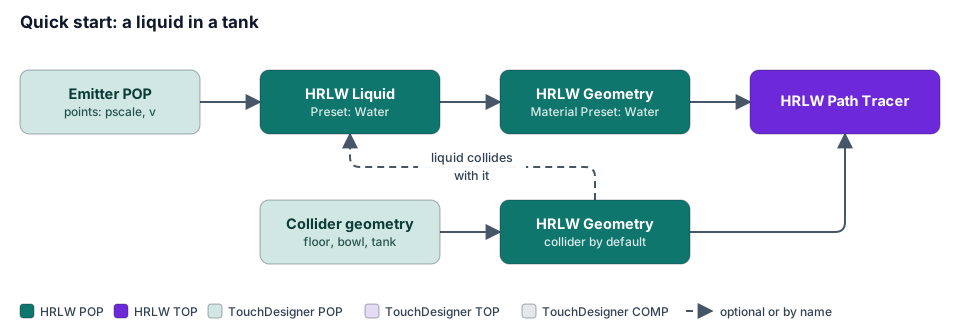
- Emitter. Make a POP with a few points, for example a Sphere POP reduced to a handful of points or a Grid POP. Give them
pscale(size) and optionallyv(velocity): a moving point is a jet; a big box with Emission: Once fills a tank at the start (and at Reset). - Add an HRLW Liquid POP (
liquid1). Set Center and Size to the box the liquid may fill (or name another solver in Box From to share its box). Leave Resolution at 96. Point Source POP at your emitter. - Wire
liquid1into an HRLW Geometry POP. Its Material Preset (Auto) follows the Liquid POP's Preset, so Water renders as water. - The HRLW Path Tracer TOP renders it. You should see the box drawn in blue (Preview Bounds) and liquid falling in.
- Make it hit something: any other HRLW Geometry POP in the network is a collider by default (Collision HRLW Geometry POPs, Colliders page), so a floor or a bowl just works.
Start with Preset Water and Quality Balanced. For a calm, thick liquid raise Viscosity; for splashy water raise Splashiness.
Inputs, attributes and parameters#
Emitter points (Source POP)#
| Attribute | Meaning |
|---|---|
P |
where it emits |
pscale |
sphere diameter (or box scale), else Default Size × Size Scale |
scale |
with Source Shape Box: pscale × scale per axis |
v |
initial velocity (× Velocity Scale) |
viscosity |
per-emitter viscosity; that liquid keeps it as it flows and mixes (honey and water poured into one tank stay honey and water) |
Force POP and Collider POP#
| Attribute | Meaning |
|---|---|
Force POP: forcetype |
0 attract (negative strength repels), 1 swirl around N, 2 push along N |
strength, radius |
force and falloff radius (else Default Force Radius); × Force Strength Scale |
| Collider POP spheres | diameter pscale × Collider Size Scale, moving with v |
Up to 64 force points and 256 collider spheres.
Parameters#
| Page | Parameter (default) | What it does |
|---|---|---|
| Liquid | Preset (Custom) | Water, Water, Splashy, Milk, Blood, Oil, Paint, Slime, Honey, Lava, Mercury: sets splashiness, viscosity, friction and surface smoothing once. Editing one of those turns the menu back to Custom. |
| Quality (Custom) | Fast, Balanced, High: particles per cell, surface detail, pressure iterations and substeps. | |
| Play (on), Reset | Pause / start over. | |
| Resolution (96) | Cells along the box's longest side. Dominates cost: doubling it is 8× the cells for a full volume. | |
| Center, Size | The box. | |
| Box From (solver) | Name another HRLW Liquid POP, Volume Solver or Bodies POP to use its box, live (Center and Size grey out). Empty: this one's own. | |
| Preview Bounds (on) | Draws the box in blue in the Path Tracer image. Turn off for final output. | |
| Boundary (Open Top) | Open Top (a tank), Closed Box, Floor Only (pours over the sides and is gone), Open. | |
| Gravity, Time Scale (1) | ||
| Catch Up Dropped Frames (off) | After dropped frames take a longer step instead of slowing down (up to 4). After a pause it resumes with one frame. | |
| Max Substeps per Frame (4) | Fast liquid takes more steps; 2 caps the cost of splashes. | |
| Viscosity (0) | 0 water, about 0.005 oil, 0.05 slime, 0.15 honey, 0.4 lava (area per second). Solved implicitly: always stable. | |
| Surface Tension (0) | sigma / rho; water is 0.000073 with 1 unit = 1 m. Matters at centimetre scale (drops, a pour into a glass). | |
| Splashiness (0.95) | The FLIP ratio. Lower is calmer and smoother. | |
| Volume Correction (0.5) | Pushes apart squeezed places so the liquid keeps its volume. | |
| Max Particles (thousands, 2000), Particles per Cell (8) | 4 halves the particle work at some cost in smoothness. | |
| Adaptive Particles (on) | Deep in the liquid one particle stands for 8. | |
| Thin Features (off), Thin Feature Foam (0) | Finer particles in sheets and drops; optional foam on thin features. | |
| Sources | Source POP, Source Shape (Sphere), Emission (Continuous) | Once fills a tank at start/Reset. |
| Default Size (no pscale) (0.2), Size Scale, Velocity Scale | ||
| Surface Positions / Mask / Normals TOP, Surface Mask Channel, Surface Rate (0.2), Surface Speed (0) | A texture pours liquid: each covered texel releases a layer per second along its normal. Goes through system memory and arrives a cook late; keep at about 512². Greyed out without Surface Positions TOP. | |
| Colliders | Collision HRLW Geometry POPs (*) |
Names, patterns, ^ excludes (* takes all). Empty turns it off. |
| Collider Thickness (1.5) | Shell thickness in cells for open surfaces. | |
| Friction (0) | 0 slides, 1 sticks. | |
| Collider POP (spheres), Collider Size Scale | Moving spheres; the scale greys out without a Collider POP. | |
| Solver Interaction (off), Boiling Temperature (gas) (0.3), Boil Rate (1) | Couples with a Volume Solver (below) and lets other solvers' outputs collide. Boiling Temperature is on the Volume Solver's temperature scale (the same numbers as its Ignition Temperature). | |
| Forces | Forces From (solver) | Name another solver to use its Force POP, radius and strength, live (the three below grey out). Empty: this one's own. |
| Force POP, Default Force Radius (0.5), Force Strength Scale | Radius and scale grey out without a Force POP. | |
| Copy Box and Forces to Other Solvers | One-off copy of this box and these forces into the other solvers' own parameters. | |
| Output | Output (Surface) | Surface mesh or Particles. |
| Surface Detail (2), Surface Threshold (0.5), Surface Smoothing (1), Surface Method (Smooth) | Mesh quality. | |
| Output to TouchDesigner (Auto) | Whether TouchDesigner receives a copy (below). | |
| Whitewater | see Chapter 4 | Amount, speeds, lifetimes, render mode. |
| Advanced | Pressure Solver (Multigrid), Pressure Iterations (10) | Multigrid-preconditioned CG, warm started, stops early. SOR is older and wants 60+. |
| Two-Level Pressure (off) | Coarse grid deep in the liquid; off by default because it measured slower. | |
| Adaptive Depth (5), Max / Min Particle Size | Tuning for Adaptive Particles and Thin Features (greyed out while those are off). |
Rendering it#
The HRLW Geometry POP's Material Preset defaults to Auto, which picks the material of the same name as the Liquid POP preset: Water, Milk, Blood, Honey, Lava, Mercury, Slime, and so on. Set the Path Tracer's Units per Metre to your scene scale so the depths of absorption are right.
Working with other operators#
- Colliders: HRLW Geometry POPs, as in Chapter 1. Closed pieces are solid, open pieces are thin shells. A solver never collides with its own output.
- One box, one set of forces: Box From and Forces From make a Volume Solver or Bodies POP follow this liquid's box and forces (or the other way round), so moving one moves them all.
- Fire and water (Solver Interaction, Colliders page): the liquid boils off in gas hotter than Boiling Temperature at Boil Rate; a Volume Solver with Solver Interaction on douses its fire where the liquid touches it and turns the heat into steam (Chapter 5).
- Bodies: a Bodies POP in the same network floats and drags in the liquid when both have Solver Interaction on (Liquid Force Scale on the Bodies POP; Chapter 6).
- Wetness: an HRLW Geometry POP's Weathering page wets surfaces where the liquid reaches (Chapter 8).
Advanced#
Output to TouchDesigner (Output page). Wiring the Liquid POP straight into an HRLW Geometry POP reads the surface on the GPU where it was written, with no TouchDesigner buffers and no CPU wait. Auto hands TouchDesigner a copy only while the node's viewer is on, or when no HRLW Geometry POP reads it directly. Set On if both an HRLW Geometry POP and other POPs use it. When no copy is made, the Liquid POP outputs an empty POP, which costs nothing.
Surface. Particles splat a density onto a grid Surface Detail times finer than the simulation. Surface Method Smooth shapes kernels per particle (anisotropic, Yu & Turk): flat across a sheet, long along a thread, round in the bulk. The mesh is made by surface nets (welded, closed at the walls, normals from the density gradient) and written on the GPU. Detail 2 meshes 8× the cells of 1, 3 meshes 27×, 4 meshes 64×, but only in tiles the surface may pass through, so memory follows the surface area. Changing Surface Detail does not restart the simulation.
Substeps and safety. Substeps follow the fastest particle (never more than about 1.5 cells a substep). Particles never go faster than twice what the substeps can carry; a collider hands the liquid at most 16 cells a frame.
Memory. About 70 bytes per cell, 80 per particle of Max Particles (2 million: 160 MB) and 12 (detail 1) or 96 (detail 2) bytes per surface cell. 96³ at detail 2: about 150 MB plus particles.
Speed guide. One GPU running a liquid, a fire and the renderer at 30 fps: liquid at Resolution 128 to 192 with Quality Fast or Balanced and Surface Detail 1; gas at 96 to 128 with Detail; renderer at 1 sample with DLSS-RR. Adaptive Particles (on) makes pools and tanks about 8× cheaper in the bulk without changing the surface.
Info CHOP. particles, mesh_points, mesh_triangles, substeps, max_speed, gpu_mb, the box, pressure_iters, collider_tris, collider_open_tris; timings sim_ms (split into sim_sources_ms, sim_p2g_ms, sim_forces_ms, sim_pressure_ms, sim_project_ms, sim_g2p_ms, sim_substeps_ms, sim_whitewater_ms, sim_sort_ms), output_ms (split into mesh_*_ms), colliders_ms.
Pause behaviour. With the timeline paused, or Play off, the Liquid POP doesn't cook; the image refines instead of restarting every frame. Play off reads none of its inputs.
Compile guard. While a render pipeline compiles, the Liquid and Whitewater POPs write their output through system memory instead of TouchDesigner's CUDA interop; a cook's output waits for its step for the seconds a compile takes (this avoids a TouchDesigner hang).
Limits. Curves are not colliders. Moving colliders push the liquid with each surface point's velocity from the previous frame, which needs the HRLW Geometry POP to keep its point order.