HRLW Bodies POP
Replaces The Bullet Solver COMP with its Actor COMPs. In TouchDesigner you build rigid-body scenes from COMPs; here one POP takes a POP of points, one per body and simulates them on the GPU. It adds things the Bullet Solver COMP workflow doesn't give you directly: joints that break, glued prefractured objects, rubber that squashes, metal that dents, plastic that softens in heat, and bodies that float in the Liquid POP.
Operator type
Hrlwbodies, labelHRLW Bodies.
What it does#
Simulates rigid spheres, boxes, capsules and meshes with Augmented Vertex Block Descent (AVBD; Giles, Diaz and Yuksel, SIGGRAPH 2025): each body moves by one small Newton step on its own inertia plus every contact and joint touching it, bodies that don't touch move in parallel (graph colouring), and hard contacts and joints come from stiffnesses that ramp up and forces carried over from the last substep, so stacks stand still with few iterations. Contacts have friction (sliding, sticking, rolling). Joints can be ball, weld or spring, and any joint can break.
Quick start (beginner)#
- Make a POP of points, one per body (for example a Grid POP lifted in
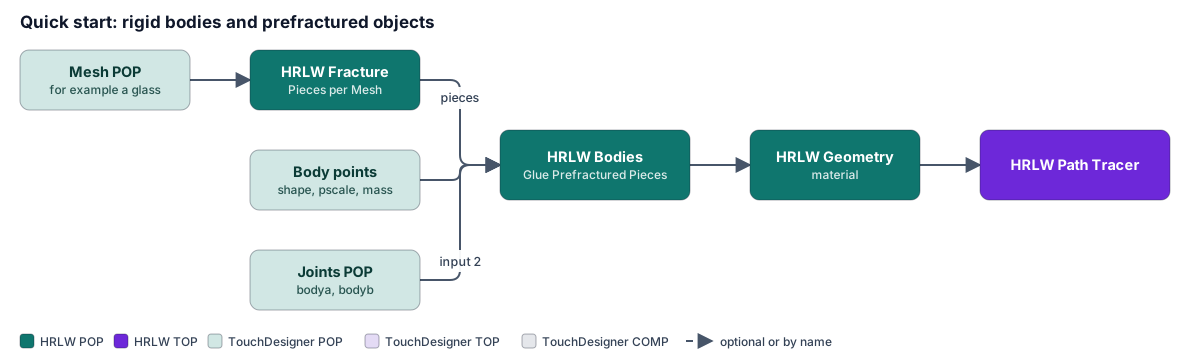
y). Optional attributes:shape,pscale,mass,Cd. - Add an HRLW Bodies POP, wire the points into input 1.
- Wire the Bodies POP into an HRLW Geometry POP and give it a material (for example Wood or Rubber).
- Watch them fall onto the Floor (on by default, at Floor Height 0).
- Add collider geometry: any other HRLW Geometry POP in the network is a static collider (Collision HRLW Geometry POPs is
*). Its extents must lie inside the Collider Box (Colliders page); turn on Fit Box to Colliders to have the box follow them. - Press Reset (Bodies page) after changing the number of bodies or any input geometry.
Heavier stacks and long chains want more Substeps per Frame (default 2) or Iterations (default 8). The Info CHOP's max_penetration rising means it needs more of either.
Inputs#
| Input | What goes in |
|---|---|
| 1 | A POP of points (one per body), or a POP of triangles/quads split into bodies by meshid (each mesh starts where it is). With the HRLW Fracture POP wired here, each piece is a body (Chapter 7). |
| 2 | Joints (optional): a POP of points, one per joint, at the anchor. |
| 3 | Meshes for instancing: split by meshid; a point's meshid picks its mesh (or shape 3 / Shape Mesh = the first one). |
Attributes#
Body points (input 1)#
| Attribute | Meaning |
|---|---|
P |
start position |
orient (quaternion x y z w) or rot (degrees about x, then y, then z) |
start orientation |
shape |
0 sphere, 1 box, 2 capsule, 3 mesh; else Shape |
scale × pscale |
size: a box's sides; a sphere's diameter is x; a capsule's diameter is x and its length (caps included) is y. Else Size. |
mass (else Density × volume, or a density attribute) |
|
friction, bounce |
|
v, w |
start velocity and angular velocity (radians per second); × Velocity Scale |
Color / Cd |
|
kinematic 1 (or active 0, or mass 0) |
follows its input every frame; pushes others, is never pushed (a paddle, a moving platform) |
static 1 |
held where it starts, weightless and cheap, until pushed harder than Wake Force × its weight (a hit, a heavier body landing, a liquid or gas push, a breaking glue joint). Shelves of glasses and walls of bricks stay put until disturbed. Static glued pieces wake as one object; a static anchor still holds dynamic pieces glued to it. Survives the HRLW Fracture POP. Takes effect at Reset. |
materialid |
the material of Appendix A: density, friction, bounce, soft, dent and heat values (unless density, mass, friction or bounce say otherwise). Liquid numbers and 0 leave the body on the Material menu. |
textureid |
texture set, passed on to the HRLW Geometry POP |
meshid |
which mesh (inputs 1 and 3) |
Joints (input 2)#
| Attribute | Meaning |
|---|---|
bodya, bodyb |
point numbers in the bodies' POP; bodyb -1 or missing = the world |
jointtype |
0 ball, 1 weld, 2 spring; else Joint Type |
stiffness |
springs: force per unit of stretch |
breakforce |
0 = never |
Jointed bodies don't collide with each other. With mesh bodies from one POP, joints name bodies by their place in meshid order (lowest first).
Output attributes#
| Output | Attributes |
|---|---|
| Mesh | P, N, Cd, Tex; also materialid, textureid; meshid with any mesh bodies |
| Points | P, orient, scale, pscale (bounding diameter), v, w, Cd; a mesh body's point is where its mesh's origin goes |
| Both | Every other input attribute passes through under its own name, size and type (IOR, Roughness, glueid, your own; up to 32 floats a point, 4 components each). Mesh bodies keep per-vertex and per-primitive values; point bodies spread theirs over their mesh. This reaches an HRLW Geometry POP reading the bodies on the GPU too. Bodies' own inputs (mass, static, orient, scale, ...) and inside, cutid, gluestrength are left out. |
Parameters#
| Page | Parameter (default) | What it does |
|---|---|---|
| Bodies | Play (on), Reset | Reset starts over from the input; so does any change in the number of bodies. |
| Gravity (0, -9.8, 0), Time Scale (1) | ||
| Substeps per Frame (2), Iterations (8) | ||
| Floor (on), Floor Height (0), Ground and Collider Friction (0.6) | ||
| Linear / Angular Damping (0), Max Speed (0 = none) | Round shapes roll forever with no rolling resistance yet: add Angular Damping. | |
| Impact Speed (0.5) | Hits faster than this are handed to HRLW Geometry Melt as splashes. | |
| Glue Prefractured Pieces (on), Break Strength (50 g) | See Chapter 7. 0 = never breaks. Takes effect at Reset. A piece's gluestrength wins, then its materialid's glue (Glass 6, Wax 10, Ice 12, Paper/Fabric 15, Stone 20, Plastic 30, Wood 40, Rubber 80, Metal 150); picking a Material loads its glue here. |
|
| Wake Force (1 g) | Threshold for waking static bodies. |
|
| Liquid Force Scale (1), Gas Force Scale (1) | Buoyancy and drag from a Liquid POP with Solver Interaction on; a fire's updraft and an explosion's blast from a Volume Solver with Solver Interaction on. Gas 1 is real air, which barely moves anything heavier than paper; raise to 20 to 100 for a stylised push. | |
| Input | Shape (no shape attribute) (Box), Size (no scale attribute) (1,1,1), Size Scale | |
| Material (Default), Material From HRLW Geometry POP (on) | Loads a material's density, friction, bounce, soft, dent and heat into the parameters (editable; editing one turns it back to Custom, picking it again reloads). With "from HRLW Geometry POP" on, it follows the downstream HRLW Geometry POP's Material Preset. | |
| Density (1), Friction (0.5), Bounce (0), Velocity Scale, Color | Fallbacks where there is no attribute or materialid. |
|
| Joint Type (Ball), Spring Stiffness (100), Break Force (0) | Fallbacks; greyed out without joints in input 2. | |
| Deformation | Deformation (on) | Master switch for soft, dents and heat (rigid scenes: turn off; no lattices at the next Reset). |
| Soft Wobble Hz (0 = rigid), Soft Damping (0.1), Lattice Cubes Across (6), Squash Limit (0.35) | A lattice of cubes over each mesh body, made at Reset. Rubber is 3 Hz. | |
| Deflate When Charred (0.85) | Burning softens and slumps the body. | |
| Heat Softens, Softening Starts at Heat (0.33), Shape Flow Rate (1), Bend Limit (0.9) | Plastic 1.5, Metal 1, Candle Wax 0.5. Needs the HRLW Geometry POP's burn on, with the Unique UV layout. | |
| Dent (0), Dent Amount (1), Dent Speed (2), Dent Depth Limit (0.3) | Metal 1, Wax 0.8, Plastic 0.6, Wood 0.3. Glass, stone and ice stay rigid. | |
| Forces | Forces From (solver) | Name another solver to use its Force POP, radius and strength, live. Empty: this one's own. |
| Force POP, Default Force Radius (0.5), Force Strength Scale | The same Force POP points push Liquid, Gas and Bodies. | |
| Copy Box and Forces to Other Solvers | One-off copy of this box and these forces into the other solvers' own parameters. | |
| Emitter | Emitter POP, Emit (on) | Each point emits bodies while the simulation plays. The rest of the page is greyed out without an Emitter POP. |
| Period (0.5 s), Bodies per Emission (1), Life (0 = forever), Max Alive per Point (20), When Full (Recycle the Oldest or Stop Emitting) | Max Alive is made at Reset; the spares wait out of the simulation. | |
| Default Velocity, Velocity Spread, Spin Spread, Position Jitter, Seed | ||
| Interact | Body HRLW Geometry POPs (empty), Geometry Bodies Are (Kinematic) | See Geometry POPs as bodies below. Named POPs stop being colliders. |
| Mouse Grab (on), Mouse CHOP, Camera From, Grab Strength (4 Hz), Grab Damping (1) | See Grabbing bodies with the mouse below. | |
| Colliders | Collision HRLW Geometry POPs (*) |
|
| Collider Box Center / Size, Collider Resolution (128), Collider Thickness (1.5), Box Sides Are Walls (off), Preview Bounds (on) | The static colliders are turned into a signed distance at Collider Resolution. Preview Bounds draws the box orange. | |
| Box From (solver) | Name another HRLW Liquid POP or Volume Solver to use its box, live (Center and Size grey out). | |
| Fit Box to Colliders (off) | Sizes the box to the collision geometry's bounds, plus a tenth of their longest side all round, measured on the GPU each cook. Box From greys out while it is on. | |
| Advanced | Overlap Kept per Substep (alpha 0.95), Warm Start (gamma 0.99), Stiffness Ramp (1), Contact Margin (0.01) | AVBD's own settings. Leave unless a stack is unstable. |
| Output | Output (Mesh), Sphere and Capsule Detail (2), UV Layout (Auto), Output to TouchDesigner (Auto) | Unique gives every body its own UV tile, which Weathering needs; Auto is Unique while an HRLW Geometry POP weathers the bodies, Per Body otherwise. |
Meshes#
- Instanced meshes (third input): the meshes split by
meshid; a point'smeshidpicks its mesh, placed byPandorient, scaled by its size (Size defaults to 1: the mesh as modelled). - One POP of triangles/quads (first input): split into bodies by
meshid. Each mesh starts where it is. Moving the input doesn't move the bodies (press Reset); changing its triangles or meshids starts over. - Meshes collide as their convex hulls (a mug is a closed cup to others; see Concave Meshes below) and render as themselves with their own
N,TexandColor. Mass comes from the hull's volume × density; they turn about their real centre of mass.
Geometry POPs as bodies#
Name HRLW Geometry POPs in Body HRLW Geometry POPs (Interact page; names and patterns like the collider field) and each becomes one mesh body, left out of the static colliders. Kinematic (default): the body follows its POP every frame (the rigid motion that best fits its points, worked out on the GPU) and pushes the other bodies about without being pushed back, so animating the POP's transform drives a paddle, a hand or a hook a chain hangs from. The POP draws itself, so the body is left out of this POP's mesh output. Dynamic: the body starts where the POP is and falls like any other, drawn in this POP's output, so take the POP itself out of the Path Tracer's scene. Its mass, friction and bounce are the Input page's. A POP's mesh is read when it first appears and whenever its point or triangle count changes, a frame or so later, and the simulation starts over then (a POP that changes its topology every frame keeps restarting it). Concave Meshes applies to them too. At most 64.
Grabbing bodies with the mouse#
Make a Panel CHOP on the Container COMP (or window) that shows the Path Tracer TOP and name it in Mouse CHOP: its u, v (0 to 1 across the image) and select (or lselect) are read; without those names the first three channels are. Camera From names the HRLW Path Tracer TOP you look through (empty: the only one there is). Pressing the button picks the body under the cursor (kinematic bodies can't be held); holding it, a damped spring pulls the point you grabbed toward the cursor at the depth you grabbed it, so the body swings and collides as you drag it. Grab Strength is how fast it follows (Hz, for every body's own mass), Grab Damping how quickly it settles (1: no overshoot). The spring gives way under a hard pull instead of stiffening, so dragging into a wall slows the body down rather than blowing it up. The Panel must show the whole image, not cropped or letterboxed, for the cursor to line up.
Emitting bodies#
Name a POP of points in Emitter POP. Every Period seconds (or a period attribute) each point emits Bodies per Emission, with a random Velocity Spread, Spin Spread and Position Jitter. Each lives Life seconds (life attribute; 0 forever). The emitter's P, orient, v and w are read at each emission, so an animated emitter sprays as it moves. Changing a point's shape, size, mesh, material, the number of points or Max Alive takes a Reset.
Soft bodies, dents and heat#
The soft, dent and heat values come from the Deformation page (picking a Material loads them there) or the body's materialid. A rubber ball squashes against what it hits, sags and wobbles; a metal body dents where it is hit hard enough; plastic and wax go soft in heat and keep the shape they were bent into; a charred soft body loses pressure and slumps. Spheres, boxes and capsules stay rigid (give them a mesh to bend); dents show on meshes, spheres and capsules (a box's own mesh has only corners). A glued prefractured object dents as one piece: a hit near a seam presses in the pieces on both sides, sized by the whole object, and the hidden cut faces never dent.
Advanced#
Info CHOP. bodies, joints, broken_joints, contacts, pairs, colors (groups for parallel solving), max_speed, dropped_pairs (pairs that found no room; there is more after a reset), mesh_points, mesh_triangles, collider_tris, gpu_mb, colliders_ms, sim_ms, output_ms, soft_bodies, soft_nodes, emitted_alive, emitter_spares. For debugging: serial_bodies (a few is fine, many slows the step), color_rounds, static_asleep, loose_pieces, glued_joints, max_penetration, max_joint_error, max_contact_g (compare with Break Strength and Wake Force).
Concave meshes (Bodies page, Concave Meshes (convex parts), off). At Reset each mesh is split into up to Max Convex Parts (16) convex parts, measured on a grid Concave Detail (32) cells across it. Cups hold what drops in, chain links hang through each other, a torus has its hole, and liquids and gases fill an unbroken cup (thin parts are thickened for them as thin bodies are). Approximate: a part's inner side is flat where the mesh curves; more parts follow curves closer. Chains hold: a 30-link chain swung hard stays linked at the default iterations. Concave pairs cost more (each nearby pair of parts is checked); convex scenes cost the same as before. Takes effect at Reset.
Liquids and fractured glass. For a Liquid POP or Volume Solver, bodies thinner than its Collider Thickness are thickened to it, so liquid can't seep through a fractured glass's thin walls. Meshes are convex hulls to the solvers unless Concave Meshes is on, so fracture a glass (or turn it on) to fill it; its glue tears when the liquid's push passes its strength (lower gluestrength for an earlier burst; the liquid's push on a body is capped at 4 g of its weight).
Rendering. An HRLW Geometry POP wired straight to the Bodies POP reads its output on the GPU, as with a liquid. Because the mesh keeps its points and triangles in the same order until a reset, that HRLW Geometry POP refits its acceleration structure instead of rebuilding, and its motion vectors pair points by number. Points output is for instancing in TouchDesigner.
Not yet. Moving HRLW Geometry colliders act as if still. No rolling resistance.